The Anchor framework is used in almost every program built on the Solana blockchain. It makes development a lot easier by taking care of things like parsing accounts and instructions, and it also comes with built-in utils for managing accounts. One of Anchor’s most important features is its account constraints. With them, developers describe all the checks that need to happen during the execution of an instruction — verifying addresses, deriving PDAs from seeds, checking token accounts, handling initialization, and so on.
The security of an instruction code often depends on these checks. A missed check may lead to all kinds of vulnerabilities, such as broken access control, DoS, or anything else. Some constraints are huge and include a lot of cross-checks, which makes them harder to audit and takes more time to fully understand the logic. As an auditor, I’ve always wanted a simple way to visualize all the relations between accounts so I could spend less time digging through logic and quickly spot places where something might go wrong or where relations are broken.
That’s how the idea for the anchor-constraints-analyzer tool was born:
GitHub - Decurity/anchor-constraints-analyzer
But first, let’s remember how constraints look like and what they do.
Constraints
Solana instructions take a list of accounts along with a list of arguments as input. When you write an instruction in Anchor, you generally work with three pieces: the instruction handler, the account constraints, and (optionally) the instruction arguments.
Here’s an example from the nft_setup_creators instruction, which initializes a new PDA (Program Derived Account) that stores a list of NFT creators (link):
use crate::account_types::*;
use crate::errors::*;
use anchor_lang::prelude::*;

pub fn nft_setup_creators_inner( // instruction handler
    ctx: Context<NftSetupCreators>, // constraints
    args: NftSetupCreatorsArgs, // arguments
) -> Result<()> {
    let nft = &mut ctx.accounts.nft;
    // ...
}

#[derive(Accounts)]
#[instruction(args: NftSetupCreatorsArgs)]
pub struct NftSetupCreators<'info> { // Input accounts constraints
    #[account(mut)]
    pub authority: Signer<'info>,

    #[account(mut, has_one = authority)]
    pub nft: Account<'info, NftAccount>,

    #[account(init, seeds = ["creators".as_bytes(), &nft.key().as_ref()], bump, payer = authority, space = NFT_CREATORS_ACCOUNT_SIZE)]
    pub nft_creators: Account<'info, NftCreatorsAccount>,

    pub system_program: Program<'info, System>,
}

#[derive(AnchorSerialize, AnchorDeserialize, Clone, PartialEq)]
pub struct NftSetupCreatorsArgs {
    pub royalty_basis_points: u16,
    pub creators: Vec<NftSecondaryCreator>,
}
The instruction handler nft_setup_creators_inner receives the NftSetupCreators context (which performs all account checks) and the instruction arguments. Only after the constraints are validated does the handler run. Input arguments can also be used inside constraints if you attach them using the #[instruction()] macro.
Here’s what these constraints check:
- authority must be the transaction signer (Signer<'info>).
- nft data account must have a data field called authority, and its value must match the authority account address. This enforces access control for using the NFT account.
- nft_creators uses the init constraint, meaning the account must not exist yet and will be created in this instruction call. Its address is derived from the given seeds and bump, and it’s allocated NFT_CREATORS_ACCOUNT_SIZE bytes with the signer (authority) paying for creation.
- system_program is always the fixed address 11111111111111111111111111111111.
You can already see that some checks depend on each other — for example, validating authority depends on the nft account’s internal authority field. Missing this check would result in a broken access control vulnerability. This example is small, but in real programs these constraints can grow huge (like this one).
The anchor-constraints-analyzer tool helps with fast static checks and generates visualization graphs that make understanding these constraints much easier.
How the tool works
The tool uses tree-sitter to parse the source code into a tree. After parsing, it looks for constraint structures, converts them into custom Python types, and analyzes each account inside the structures. The main idea of the analysis is to make sure that all accounts in constraints are “defined” by something. If some account isn’t defined by anything or is defined insufficiently, then there might be problems.
“Definitions”
In the context of this tool, a properly defined account is one that has all the necessary checks tying it to other variables. For example, in the NftSetupCreators constraints, the authority account is considered defined because the nft account uses a has_one check to validate it. If some variables inside the constraints aren’t defined (meaning they don’t have enough validation behind them), that’s where bugs can start to appear.
Before we dive deeper into examples, let’s recall what kinds of variables usually show up in account constraints — the ones that can validate other accounts or need to be validated themselves. Typically, these include:
- constants
- input account addresses and their data fields
- instruction arguments
A constant can be anything predefined in the program code — a string, an address, a number, etc. Since constants don’t change, we don’t need to validate them; they’re treated as self-defined. Constants can also define input accounts — for example, when they’re used in account seeds or when a specific known address is expected as an input. Of course, bugs related to incorrect constants or bad logic can still happen, but they are out of scope for the tool.
Input account data (addresses or fields) can also define other accounts, similar to how constants do. This could be through seeds, the has_one constraint, or anything else. The key difference is that this data must itself be defined by some parent constraint, because the instruction caller provides it and it can contain arbitrary values. In some instructions this isn’t an issue - for example, when transferring SPL tokens from a signer’s token account to another account, we can’t validate the authority of the destination token account in constraints, since it’s allowed to be anything. Still, highlighting such unchecked accounts (those that aren’t defined by any other constraint) makes it much easier to spot real broken checks when they appear.
Instruction arguments can also hold arbitrary values, so in most cases they need to be validated as well. But unlike account constraints, these checks in most cases happen directly inside the instruction handler, not in the constraint list. Because of that, whether an instruction argument is properly defined has to be checked manually.
Special cases
- Program Derived Accounts (PDAs) use seeds and a bump to derive their address. Anchor provides the init constraint to require an account to be uninitialized and then create it using those seeds, and init_if_needed to initialize it only if it hasn’t been created yet. If neither init nor init_if_needed is present, then the PDA must already exist beforehand. In that case, all PDA seeds and elements in the has_one constraint are implicitly “defined” by the account itself - if the seeds were wrong, the derived address wouldn’t match the existing PDA, and the instruction would fail. Such an initialized PDA is considered defined by itself. But if the account does use init or init_if_needed, then the seeds can be arbitrary, meaning they aren’t considered defined by the account.
- Associated Token Accounts (ATAs) are checked using the associated_token constraint, which references the mint, authority, and token_program accounts. For an ATA to be considered properly defined, both the mint and authority must be specified. If one of them is missing, the ATA might correspond to the wrong mint or authority, so in that situation it’s treated as undefined.
Consider the following simple example:
#[derive(Accounts)]
pub struct UpdateConfig<'info> {
    #[account(mut)]
    pub authority: Signer<'info>,

    #[account(
        mut,
        seeds = [b"config", authority.key().as_ref()],
        bump
    )]
    pub config: Account<'info, Config>,
}
These are the account constraints for an instruction that updates a config data account. Logically, this kind of instruction should require some form of authorization before the config can be updated.
We have two accounts here — authority and config. Since the config account doesn’t use init or init_if_needed, its seed values (the authority account, plus the constant seed "config") are considered defined by the config account itself. The constant is already defined by default and cannot change, but if the provided authority is incorrect, the derived PDA won’t match any existing account, and the instruction will simply fail. For the same reason, the config account is also considered self-defined — using the wrong address would fail immediately.
However, this doesn’t eliminate the possibility of logical bugs. For example, another instruction in the program might allow initializing arbitrary config accounts with any authority, which would bypass checks of the UpdateConfig constraints.
Graphs
The anchor-constraints-analyzer tool generates a Markdown file containing Mermaid graphs that show how accounts are related through constraints. Now let’s look at a more complex example from the Metaplex protocol (link):
#[derive(Accounts)]
pub struct DelegateAuctioneer<'info> {
    // Auction House instance PDA account.
    #[account(
        mut,
        seeds = [
            PREFIX.as_bytes(),
            auction_house.creator.as_ref(),
            auction_house.treasury_mint.as_ref()
        ],
        bump=auction_house.bump,
        has_one=authority
    )]
    pub auction_house: Account<'info, AuctionHouse>,

    #[account(mut)]
    pub authority: Signer<'info>,

    /// CHECK: The auction house authority can set this to whatever external address they wish.
    /// The auctioneer authority - the program PDA running this auction.
    pub auctioneer_authority: UncheckedAccount<'info>,

    /// The auctioneer PDA owned by Auction House storing scopes.
    #[account(
        init,
        payer = authority,
        space = AUCTIONEER_SIZE,
        seeds = [
            AUCTIONEER.as_bytes(),
            auction_house.key().as_ref(),
            auctioneer_authority.key().as_ref()
        ],
        bump
    )]
    pub ah_auctioneer_pda: Account<'info, Auctioneer>,

    pub system_program: Program<'info, System>,
}
The resulting graph for this code looks like this:
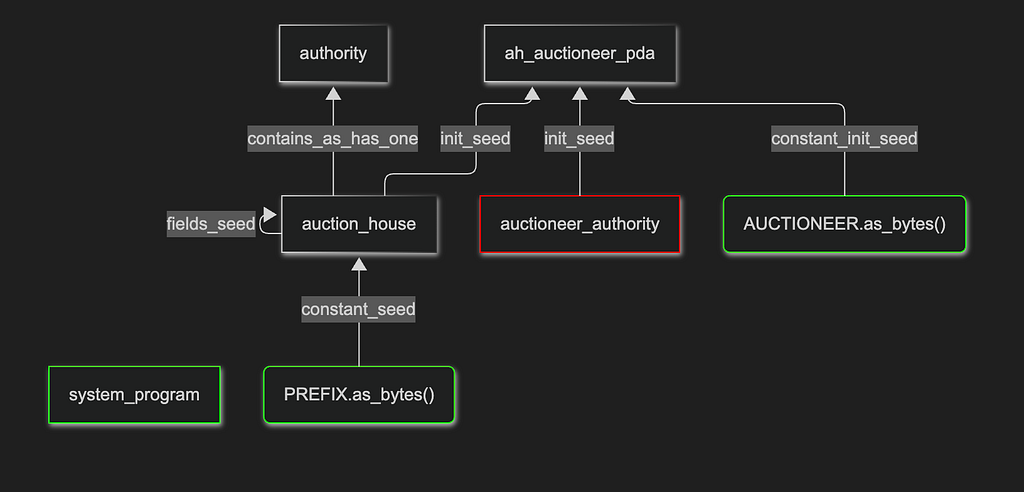
The graph should be read from bottom to top.
Green elements represent constants or system addresses — values that never change. Red elements highlight accounts that aren’t properly defined. If the graph includes instruction arguments or custom logic checks, they’ll appear in orange, indicating that they require manual review.
Graph elements can have various connections. In this example, the auction_house account must already exist, and it’s defined by its seeds - the "PREFIX" constant and its own internal fields. Since this account is properly defined, its has_one constraint on the authority field means the authority account becomes defined as well. This is how authorization is enforced: only the correct authority tied to a given auction_house is allowed to act.
Next, the ah_auctioneer_pda account uses the init constraint, so it can’t define any other accounts. It’s derived from auction_house, auctioneer_authority, and the "AUCTIONEER" constant. But the graph shows that auctioneer_authority isn’t defined by anything — meaning it can be any arbitrary account. This could be a red flag if the instruction’s logic wouldn’t allow arbitrary auctioneer authority by design. Even though in this specific instruction it isn’t an issue, seeing the full graph representation makes constraint analysis much easier.
Usage
The tool can analyze either a single file or an entire directory recursively. If you want to generate a graph, just provide the output path as the second argument:
pip3 install -r requirements.txt # install requirements
python3 run.py [-q] <source code file or directory> [<output MD file with graphs>]
Note that for better Mermaid graph rendering, the elk renderer should be supported. For example, Markdown Preview Mermaid Support and Mermaid Chart vscode extensions support it.
Use cases and improvements
Obviously, this tool can be really helpful for Solana auditors and developers who need to understand code logic quickly. Since things like custom constraints or deeper logic bugs can’t always be caught automatically, you can combine the tool’s output with AI-based code analysis to get even more accurate results. And over time, more custom checks can be added so the tool can spot even more issues on its own.
References
- https://github.com/Decurity/anchor-constraints-analyzer
- https://www.anchor-lang.com/docs/references/account-constraints
- https://tree-sitter.github.io/tree-sitter/
- https://github.com/metaplex-foundation/metaplex-program-library
- https://marketplace.visualstudio.com/items?itemName=bierner.markdown-mermaid
- https://marketplace.visualstudio.com/items?itemName=MermaidChart.vscode-mermaid-chart
Auditing Solana Anchor constraints was originally published in Decurity on Medium, where people are continuing the conversation by highlighting and responding to this story.
Need this expertise on your protocol?
The researchers who write this are the ones who run the audits.